Search engine optimization for e-commerce requires a meticulous approach to how URLs are constructed and maintained. In Magento 2, the flexibility of the platform can be a double-edged sword; while it offers granular control, incorrect configurations can lead to duplicate content issues, crawl budget wastage, and poor user experiences. This guide details the technical and strategic best practices for managing URL structures within the Magento ecosystem to ensure maximum search visibility and long-term scalability.
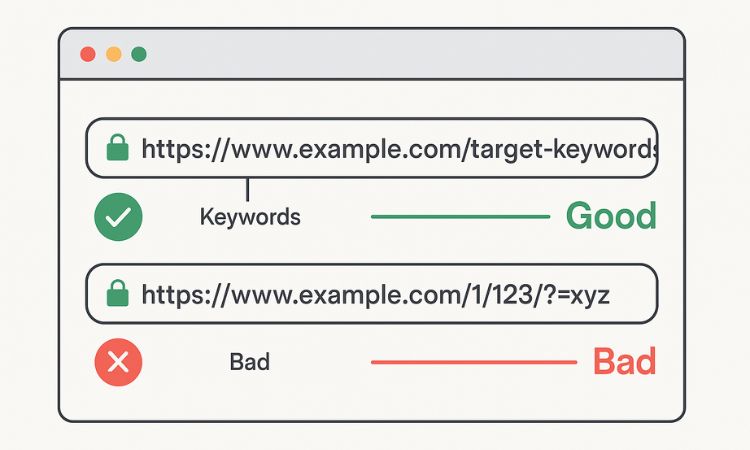
The foundation of a high-performing Magento store lies in its readability. Short, descriptive URLs are preferred by both search engine crawlers and human users. When a URL is concise, it is easier to share on social media, more likely to be clicked in Search Engine Results Pages (SERPs), and simpler for crawlers to parse.
Why readability matters
Clean URLs serve as a signal to the user about the content of the page before they click. From a technical standpoint, shorter URLs help prevent issues with character limits in certain browsers and legacy systems. Furthermore, a URL that mirrors the page's primary topic reinforces the keyword relevancy of the document.
Best practices for URL keys
Magento automatically generates "URL Keys" based on product and category names. However, automatic generation often results in "noisy" URLs.
In Magento, you can control these at the product level under the Search Engine Optimization section. For high-value pages, manual intervention is always superior to automated logic.
One of the most debated settings in Magento is whether to include the category path in the product URL. While it might seem intuitive to show the breadcrumb trail in the address bar, it often creates more problems than it solves for large-scale e-commerce.
Recommended configuration
Navigate to Stores → Configuration → Catalog → Catalog → Search Engine Optimization and set Use Categories Path for Product URLs to No.
The logic behind flat URLs
Setting this to "No" ensures that every product has a single, top-level URL (e.g., /nike-air-zoom-pegasus) regardless of which category the user is currently browsing.
Magento’s dynamic nature means that a single product page can often be accessed via several different URL variations, especially when factoring in layered navigation or different entry points.
The role of canonical tags
A canonical tag tells search engines: "Even if you found this content at several different URLs, this specific URL is the 'master' version."
Essential Magento configuration
To prevent search engines from penalizing your store for duplicate content, you must enable canonical tags in the backend:
This is particularly important if you choose to keep category paths enabled, as it helps point all variations back to a single source of truth.
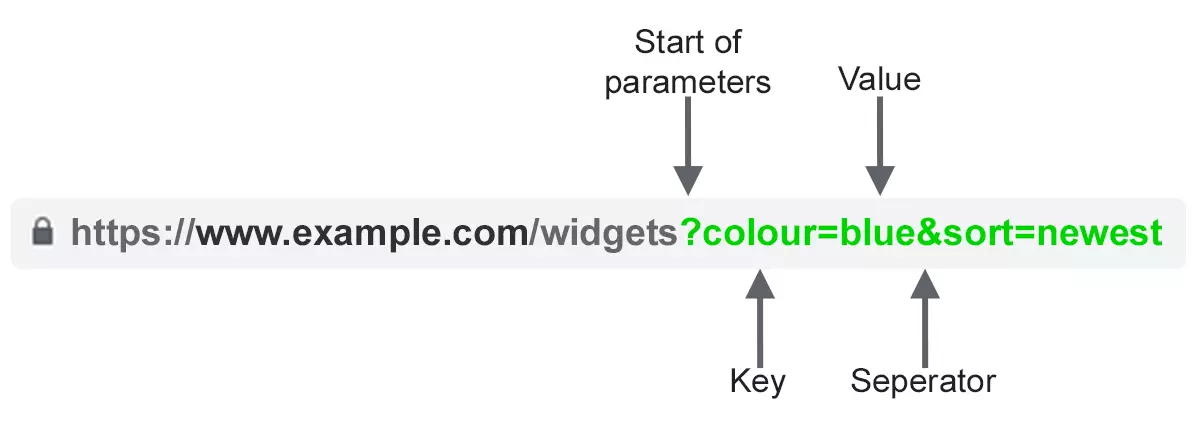
Layered navigation is a powerful tool for users but a nightmare for SEO if left unmanaged. Filters for color, size, and price generate thousands of unique URL combinations that provide no unique content value to a search engine.
Managing crawl budget
If a crawler spends its entire "budget" indexing /shoes.html?color=black and /shoes.html?color=blue and /shoes.html?size=10, it may never reach your new product pages or high-margin categories.
Recommended actions
Magento provides the option to append a .html suffix to product and category URLs. This is a legacy feature from early web development, but it remains a standard in many Magento setups.
Choosing a strategy
There is no inherent SEO advantage to having or not having .html. The priority is consistency.
Configuration
Under Stores → Configuration → Catalog → Catalog → Search Engine Optimization, locate Product URL Suffix and Category URL Suffix. If you decide to remove them, leave these fields blank. If you are migrating an existing store, changing this setting requires a site-wide redirect strategy to avoid a total loss of indexed pages.
As a store grows, products are discontinued, categories are renamed, and URLs are inevitably changed. How you handle these transitions determines whether you keep your search rankings.
The danger of 404 errors
When a URL is deleted without a redirect, it returns a 404 (Not Found) error. While a few 404s are natural, an accumulation of them signals to search engines that the site is poorly maintained, leading to a drop in overall domain authority.
Using Magento URL rewrites
You can set up URL Rewrite in Magento 2 in: Marketing → SEO & Search → URL Rewrites.
Use lowercase URLs only
URLs are technically case-sensitive. To a web server, /Product-Name and /product-name are two different locations.
Best practice for standardization
To avoid confusion and duplicate content, always enforce lowercase characters for URL keys.
Lowercase URLs are the industry standard; they look cleaner and prevent "broken link" issues caused by users or third-party sites typing a URL with different casing.
Magento’s multi-store architecture is one of its strongest features, but it requires careful URL planning to ensure search engines serve the right version to the right audience.
Subdirectories versus parameters
Avoid using store codes as parameters (e.g., https://www.google.com/search?q=example.com/%3F___store%3Dfr). Instead, use subdirectories for different languages or regions:
Hreflang tags
When running a multi-store setup, you must implement hreflang tags. These tags tell search engines that the English page and the French page are localized versions of each other. This prevents them from being flagged as duplicate content and ensures the user is directed to the correct language version based on their location or browser settings.
Regularly audit URLs after catalog changes
A Magento catalog is a living entity. Periodic audits are necessary to ensure that your URL structure hasn't degraded over time due to bulk imports or manual errors.
Audit checklist
The benefits of a clean URL structure extend beyond SEO into the realm of data analysis and business intelligence.
Cleaner reporting
When you export your sales data or view your Google Analytics reports, clean URLs make it significantly easier to identify top-performing products. If your URLs are messy and full of IDs or random strings, you will spend more time cleaning data in Excel than analyzing it.
Integration with third-party tools
Whether you are syncing your catalog with Facebook Shop, Google Merchant Center, or an ERP system, stable and readable URLs ensure that these integrations remain "set and forget." Frequent changes to URL structures can break image paths or product links in external marketing feeds, leading to rejected ads and lost revenue.
Optimizing the URL structure in Magento is not a one-time task but a foundational strategy. By prioritizing short, keyword-rich URLs, enforcing canonicalization, and managing layered navigation parameters, you create a store that is easy for search engines to crawl and easy for customers to navigate. Consistency across your multi-store views and a proactive approach to redirects will ensure that your Magento store maintains its search authority even as your catalog grows and evolves.


