Content architecture and topic clustering represent the structural backbone of a high-performing Magento store. For many e-commerce businesses, the primary focus remains on product acquisition and pricing. However, without a logical structure that connects informational intent with transactional capability, a store often suffers from fragmented visibility. This guide provides a factual, Magento-specific framework for organizing content to achieve scalable SEO growth.
In the specific environment of Magento (Adobe Commerce), content architecture refers to the intentional organization of various data entities—categories, products, CMS pages, and blog posts—into a cohesive hierarchy. Unlike a standard content site where architecture is limited to a blog or knowledge base, Magento architecture must account for complex relational data and dynamic URL generation.
A well-designed architecture achieves three primary goals:
In Magento, this architecture includes:
A weak architecture leads to Magento keyword cannibalization, where multiple pages compete for the same search term, and "isolated pages," which receive no internal link equity. A strong architecture ensures that every piece of content supports a larger thematic cluster tied to commercial intent.
Topic clustering is a strategy where a single "pillar" page serves as the main hub for a broad topic, and multiple "cluster" pages provide in-depth coverage of specific subtopics. These pages are connected through a deliberate internal linking strategy.
This model is particularly effective for Magento because the platform’s native category structure mirrors the pillar-cluster relationship. Categories naturally act as pillars, while product pages and CMS guides act as the clusters that reinforce the category’s relevance. By adopting this model, store owners move away from the "one keyword per page" mindset toward a "topical authority" mindset, which is how modern search algorithms evaluate quality.
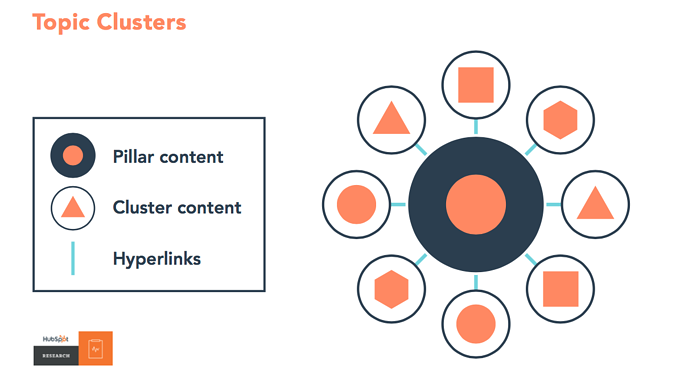
Successful execution requires assigning specific roles to the different page types available within the Magento admin panel.
In Magento, category pages should target macro semantic keywords. These are broad terms that define a product line or service area. Far too often, Magento users treat category pages as mere product grids. To function as a pillar page, a category must provide context.
For example, a store selling Magento extensions would have a category for "Magento 2 order management extensions." As a pillar, this page should include:
By adding informational content to the category description, the page becomes a comprehensive resource that search engines can rank for high-volume, broad-intent queries.
CMS pages and blog posts target micro semantic keywords. These are specific, long-tail queries that address particular problems or questions a customer might have.
Using the order management example, cluster content would include:
Each of these pages should cover its specific intent deeply. Crucially, every cluster page must link back to the pillar category page to pass "link juice" (authority) and signal that the pillar page is the definitive source for the broader topic.
Product pages are the final destination in the user journey. They should not attempt to be pillars. Instead, their role is to capture high-intent, specific product searches and convert traffic.
Product pages should be reinforced by internal links from cluster content. For instance, in a guide about "Order automation," a contextual link should point to the specific "Order Automation Pro" extension. This creates a natural flow: the user learns about a problem (cluster), understands the solution category (pillar), and finds the specific tool to buy (product).
Building a cluster requires a shift from technical implementation to strategic planning.
The core topic must be business-driven. Identify an area of your catalog that is high-margin or represents a significant portion of your revenue. Ask whether the topic supports customer retention or acquisition. An example core topic would be "Order data management in Magento 2."
Distinguish between broad and narrow keywords:
This alignment ensures that your content covers the entire searcher's journey, from the awareness stage to the decision stage.
Organize your planned content into the platform's native structures:
Internal linking is the "glue" of the topic cluster. In Magento, where thousands of links are generated automatically by menus and footers, intentional content links carry significant weight.
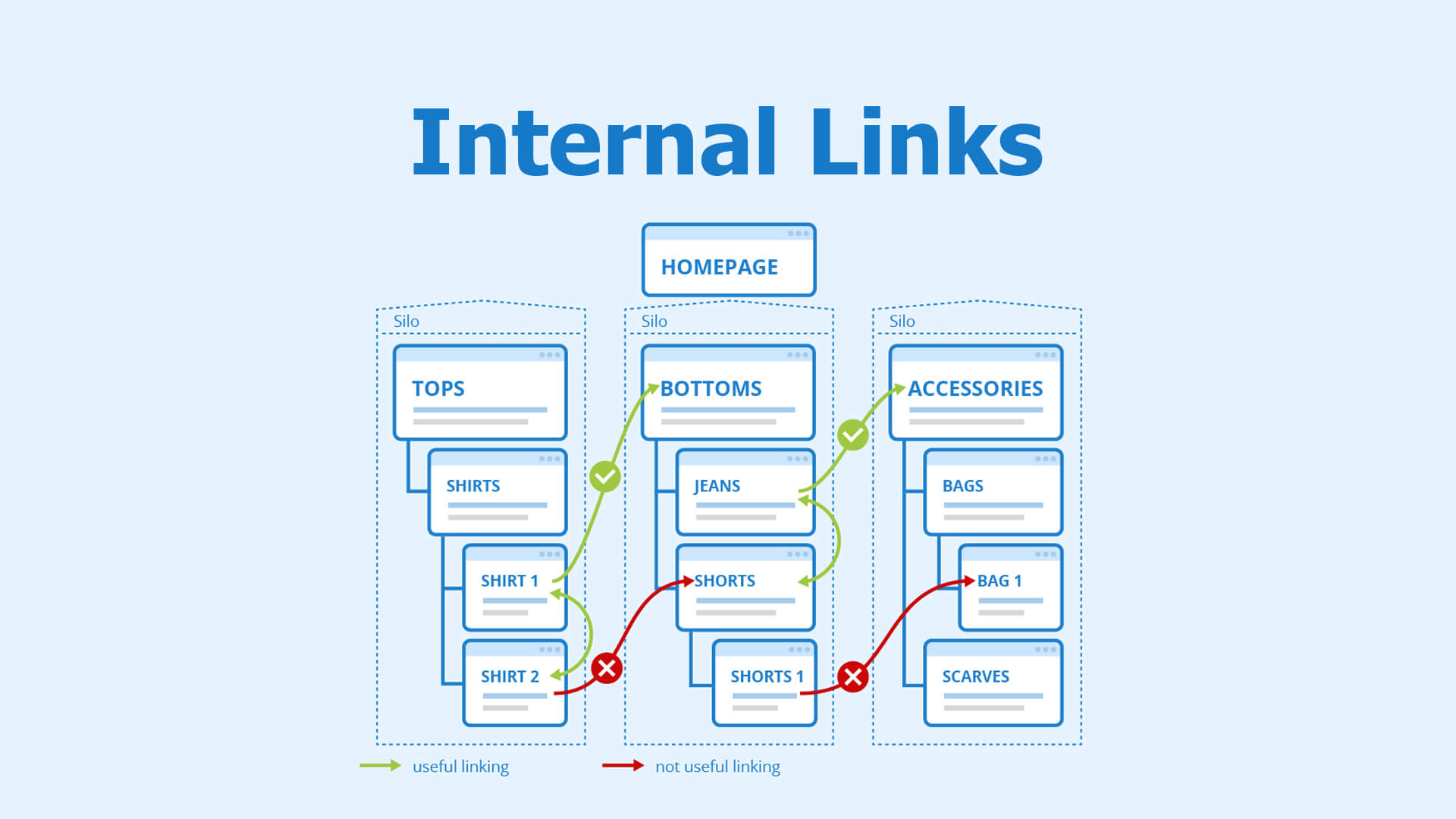
This contrast helps search engines distinguish between the general authority of the pillar and the specific utility of the cluster.
Magento provides significant control over URL structures, which should be used to reinforce the hierarchy.
Where possible, keep the topic hierarchy visible in the URL string. This provides "breadcrumbs" for both users and search engines:
Avoid flat blog URLs (e.g., /blog/post-1) that do not indicate a relationship to the commercial categories. Also, avoid auto-generated URLs that include "ids" or "strings" without context.
Magento’s layered navigation (filters for price, color, size) can create thousands of duplicate URLs. To prevent these from diluting your cluster authority:
A topic cluster should be measured as a total system rather than evaluating individual pages in isolation. Key metrics include:
When content architecture and topic clustering are implemented correctly in Magento, the store transforms from a simple catalog into a topical authority. Search engines will recognize the store as an expert in its niche, leading to higher rankings for competitive category terms. Furthermore, the store benefits from "SEO compounding," where new cluster content strengthens the rankings of existing products and categories, ensuring long-term growth without the decay associated with disconnected blogging.


