Magento 2 is an enterprise-grade e-commerce platform that recognizes the critical importance of search engine optimization (SEO) from the moment a store is deployed. One of the most fundamental components of this SEO foundation is the XML sitemap. By default, Magento 2 generates XML sitemaps using a built-in sitemap module that automatically collects store URLs and outputs them into a search-engine-friendly XML file. This process ensures that search engine crawlers like Googlebot can discover and index the store's content efficiently.
Magento 2 includes a native XML sitemap feature, which is part of the core Magento_Sitemap module. This means that for the vast majority of small to medium-sized businesses, no third-party extension is required for basic SEO needs. The system is designed to generate sitemaps based on store configuration and indexed database data, ensuring that the URLs provided to search engines are accurate and reflect the current state of the catalog.
Key characteristics of the default system
The native Magento sitemap functionality is built around the concept of "Store Scopes." Because Magento is designed to support multi-site and multi-language environments from a single installation, the sitemap generation logic is partitioned accordingly.
One sitemap per store view is the standard behavior. If a merchant operates a "Global" website with "English," "French," and "German" store views, Magento allows for the generation of three distinct XML files. Each file will contain the unique URLs, language codes, and currency formatting relevant to that specific store view.
The generation process can be handled through manual or scheduled generation. Administrators can navigate to the backend and trigger a generation immediately, or they can configure a cron job to automate the process daily, weekly, or monthly. This flexibility ensures that as new products are added, the sitemap remains up to date without requiring constant manual oversight.
Furthermore, the system automatically follows store scope parameters. This includes the base URL, which is vital for stores using subdirectories or different domains for different regions. It also respects the secure/unsecure URL settings, ensuring that search engines are directed to the HTTPS versions of pages.
When generating an XML sitemap, Magento 2 pulls URLs from multiple core entities. This ensures that the primary pillars of an e-commerce site—the products, the navigational structure, and the informational content—are all represented.
The product entity is the most complex part of the sitemap. Magento does not simply dump every product into the XML file; it applies several filters to maintain quality. Only enabled products are included; disabled products are ignored to prevent 404 errors for crawlers. Furthermore, a product must be visible in the catalog and/or search. Products set to "Not Visible Individually" (often used for simple products within a configurable product) are excluded by default to avoid duplicate content issues.
Magento also respects product URL rewrites. If a product has a custom URL key or is nested within a specific category path that changes its URL, the sitemap generator queries the url_rewrite table to fetch the finalized, SEO-friendly path rather than the internal system path (like catalog/product/view/id/123).
The category structure provides the "skeleton" of the site for search engines. Magento includes active categories in the sitemap, provided they are marked to be included in the menu navigation. If a category is created solely for internal grouping and is hidden from the frontend navigation, the default sitemap logic will typically exclude it, assuming it is not a primary landing page for users.
Informational pages—such as "About Us," "Privacy Policy," and "Terms and Conditions"—are crucial for site authority. Magento includes CMS pages that are marked as enabled. However, it intelligently excludes system pages. Pages related to the customer account, checkout, and shopping cart are not included in the XML sitemap because these pages are often blocked by robots.txt and do not contain indexable content of value to a general search user.
The homepage is always the primary entry point in the sitemap. Additionally, the store base URLs are included as the root of the hierarchy. Each URL entry in the generated XML follows the standard schema, including:
The process of turning database rows into a structured XML file involves several technical steps to ensure performance and accuracy.
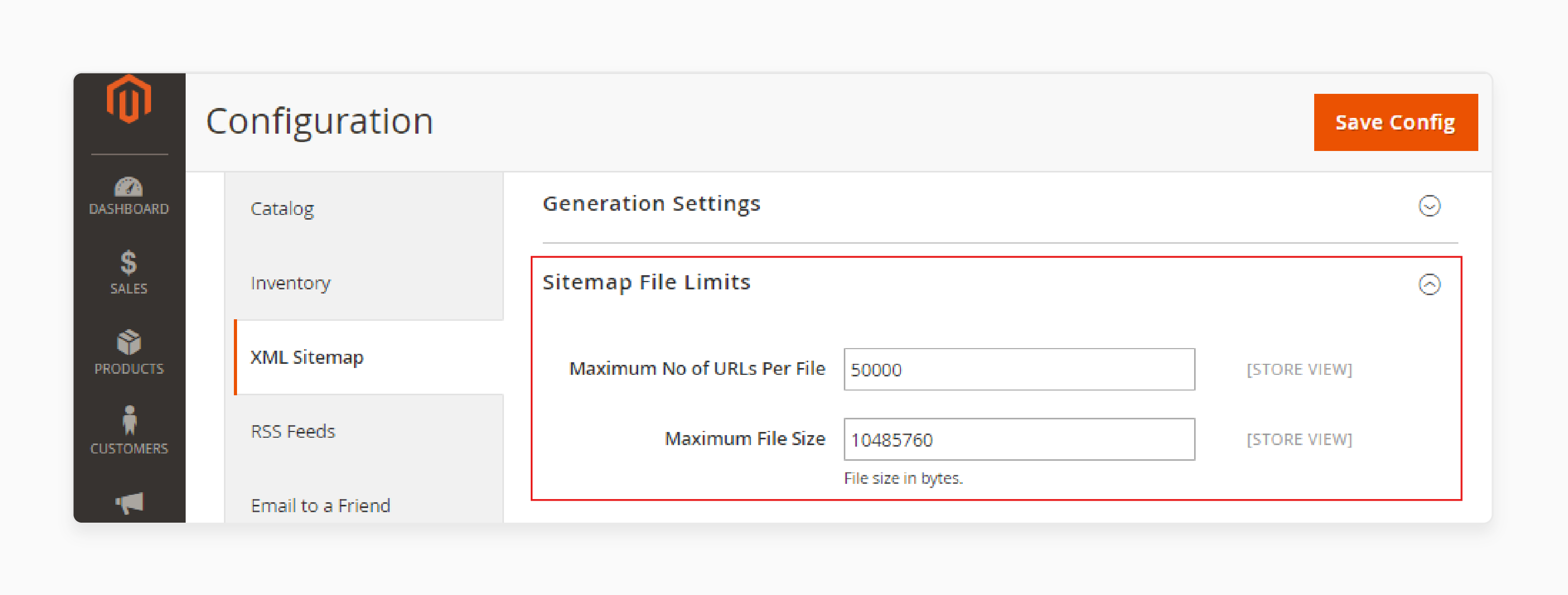
After the file is fully written, it is saved to the configured server directory. If the file size exceeds 50MB or contains more than 50,000 URLs (the limits defined by Google), Magento is designed to split the sitemap into multiple files and generate a sitemap index file to link them all together. This ensures sitemap generation is efficient and scalable, even for large enterprise catalogs.
Administrators have granular control over how the sitemap is built. These settings are located in the Admin panel under: Stores > Configuration > Catalog > XML Sitemap
Priority and frequency settings
In this section, you can define the "Change Frequency" (e.g., Always, Hourly, Daily, Weekly, Monthly, Yearly, Never) and "Priority" (a value from 0.0 to 1.0) for products, categories, and CMS pages. While modern search engines like Google place less weight on these specific tags than they used to, they remain part of the standard and help search engines understand the site's structure.
File limits and paths
Magento allows you to set the maximum number of URLs per file and the maximum file size. By default, these are set to 50,000 and 10MB to 50MB. You also define the "File Path" and "File Name." For example, if you want the sitemap at the root, you set the path to / and the name to sitemap.xml.
Image sitemap inclusion
One of the standout features of the default Magento 2 sitemap is its ability to include images. Within the product options of the sitemap configuration, you can choose to include all images, only the base image, or none. Including images in the sitemap significantly improves the chances of your product photos appearing in Google Image Search results, which is a major traffic driver for e-commerce.
Automated generation via cron
The "Generation Settings" section allows you to enable scheduled updates. You can specify the start time (usually a low-traffic period like 2:00 AM) and the frequency. You can also provide an email address to receive error notifications if the sitemap generation fails due to file permission issues or database errors.
Once the sitemap is generated, it must be accessible to search engine crawlers.
By default, generated sitemaps are stored on the server. While the admin can define the path, the standard practice in Magento's modern architecture is to store them under the pub/ directory to ensure they are web-accessible. A common path is: /pub/media/sitemap/
However, most SEO experts recommend placing the sitemap at the root (/sitemap.xml) or using a robots.txt entry to point to the actual path.
It is important to note that Magento does not "auto-submit" sitemaps to search engines. The platform generates the file and places it on your server, but the "handshake" with search engines is the merchant's responsibility. You must manually submit the sitemap URL in tools like:
By submitting the sitemap URL (e.g., https://www.google.com/search?q=https://www.yourstore.com/sitemap.xml), you provide search engines with a direct map of your site, which speeds up the discovery of new products and updates.
While the built-in functionality is robust, it is a general-purpose tool and has limitations that might affect high-level SEO strategies.
Despite the limitations mentioned, Magento’s native XML sitemap works exceptionally well for the majority of users.
For enterprise-level SEO, multi-regional stores with complex hreflang requirements, or headless integrations, API-based or extension-driven sitemap solutions are usually more appropriate. These solutions can handle the complexities of cross-domain URL mapping and high-frequency updates more effectively.
Magento 2 generates XML sitemaps by collecting enabled, index-ready URLs and applying SEO-friendly URL rewrites to ensure search engines see the best possible version of a link. By outputting a standards-compliant XML file and allowing for both manual and automated (cron) generation, Magento provides a solid SEO foundation without extra setup.
The workflow is designed to be efficient, leveraging indexed data to minimize server load. While it may lack some advanced filtering features for complex custom entities, its ability to handle multiple store views, include product images, and automatically manage file splitting makes it a highly capable tool for most Magento merchants. Understanding how these settings work allows store owners to ensure their content is always visible to the world's most important search engines.


