Page speed optimization for Magento is one of the most impactful ways to improve conversion rate, SEO performance, and overall user experience. Magento is a powerful, enterprise-grade e-commerce platform, but its architectural complexity means it is naturally resource-heavy. Without intentional optimization, stores often suffer from slow Time to First Byte (TTFB), bloated JavaScript and CSS, and sluggish checkout processes. This structured guide covers essential backend configurations, frontend wins, and server-level infrastructure required to turn a slow Magento installation into a high-performance storefront.
In the competitive landscape of e-commerce, every millisecond counts. For Magento merchants, performance is not just a technical metric; it is a direct driver of revenue and brand perception.

Before investing in expensive third-party tools, you must ensure that the core Magento engine is tuned correctly. These "must-do" steps form the foundation of performance.
Magento includes a robust built-in caching system that stores processed data so the server doesn't have to re-calculate it for every request. To manage this, navigate to Admin, then System, and select Cache Management. You must ensure all cache types are enabled, including:
Full Page Cache is the single most important setting. Without it enabled, Magento must bootstrap its entire PHP application for every single visitor, leading to unbearable wait times.
Magento operates in three modes: default, developer, and production. Many stores mistakenly remain in default or developer mode after launching. You should run Magento in production mode to minimize runtime overhead. To set this, use the command line:
php bin/magento deploy:mode:set production
The benefits of production mode include:
Bloated code files are a major bottleneck. Magento provides built-in tools to shrink these files. Navigate to Admin, then Content, then Design, followed by Configuration, Advanced, and finally Developer. You should enable:
Caution: While merging can improve speed, it can sometimes cause conflicts with certain themes or third-party extensions. Always test these settings in a staging environment before applying them to a live store.
The flat catalog feature reduces the complexity of database queries by merging product and category data into single, simplified tables. This can be configured under Stores, then Configuration, then Catalog, and finally Storefront.
However, in modern versions of Magento (2.4.x and later) and for stores with smaller catalogs, the performance gain from Flat Catalog is often negligible or even negative. If you have a massive catalog (500,000+ products), it may help, but it is recommended to test performance with and without this setting using a tool like New Relic to see which performs better for your specific database structure.
Images typically account for the largest portion of a web page's total weight. Optimizing them is often the quickest way to see a drastic improvement in First Contentful Paint (FCP).
Use next-gen image formats
Traditional formats like JPEG and PNG are often too heavy for modern web standards. You should prioritize the use of WebP, which offers superior compression without losing quality. Additionally, ensure that image dimensions are physically resized to match their display size on the frontend. Serving a 4000-pixel-wide image in a 400-pixel-wide container is a waste of bandwidth.
Enable lazy loading
Lazy loading ensures that images are only downloaded when they are about to enter the user's viewport. Magento 2.4+ includes native support for lazy loading, but it may require theme-level adjustment to ensure it is applied to:
This results in a much faster initial page load because the browser only has to fetch a handful of images rather than the entire page's assets at once.
For more information, please explore Best practices to optimize Magento image for better SEO.
While Magento’s built-in caching is powerful, high-traffic enterprise stores require specialized caching layers to achieve sub-second response times.
Use Varnish instead of built-in full page cache
Magento is designed to work seamlessly with Varnish, an open-source web application accelerator. While the built-in PHP-based FPC is good for small sites, Varnish is significantly faster because it sits in front of the web server and serves cached content directly from memory, bypassing PHP and the database entirely.
To implement this:
This setup results in a drastically faster TTFB and allows your store to handle thousands of concurrent users with ease.
Use Redis for cache and sessions
Redis is an in-memory data structure store used as a database, cache, and message broker. For Magento, it is much faster than using the file system or the MySQL database for temporary data. You should configure Redis for:
Using Redis reduces database contention and improves the overall concurrency handling of the platform.
A cluttered database slows down every process in Magento, from product searching to order placement.
Clean up logs and old data
Magento stores a large amount of historical data in "log" tables. Over time, tables related to visitor logs, quote data (abandoned carts), and reports can grow to several gigabytes. You should ensure that Magento's cron jobs are running correctly to handle automatic cleanup. Specifically, regularly monitor:
Manually truncating these tables or setting up a strict retention policy can significantly improve database query speeds.
Optimize indexing strategy
Indices are used by Magento to transform complex product data into a format that is easy to query. If indices are outdated, the store may show incorrect prices or stock, and performance will suffer. In the Admin panel under System and Index Management, you should set all indexers to "Update by Schedule." This prevents the system from trying to re-index every time a single product is saved, which can lock database tables and slow down the site.
No amount of software optimization can compensate for poor hardware. Magento requires a modern, high-performance hosting stack.
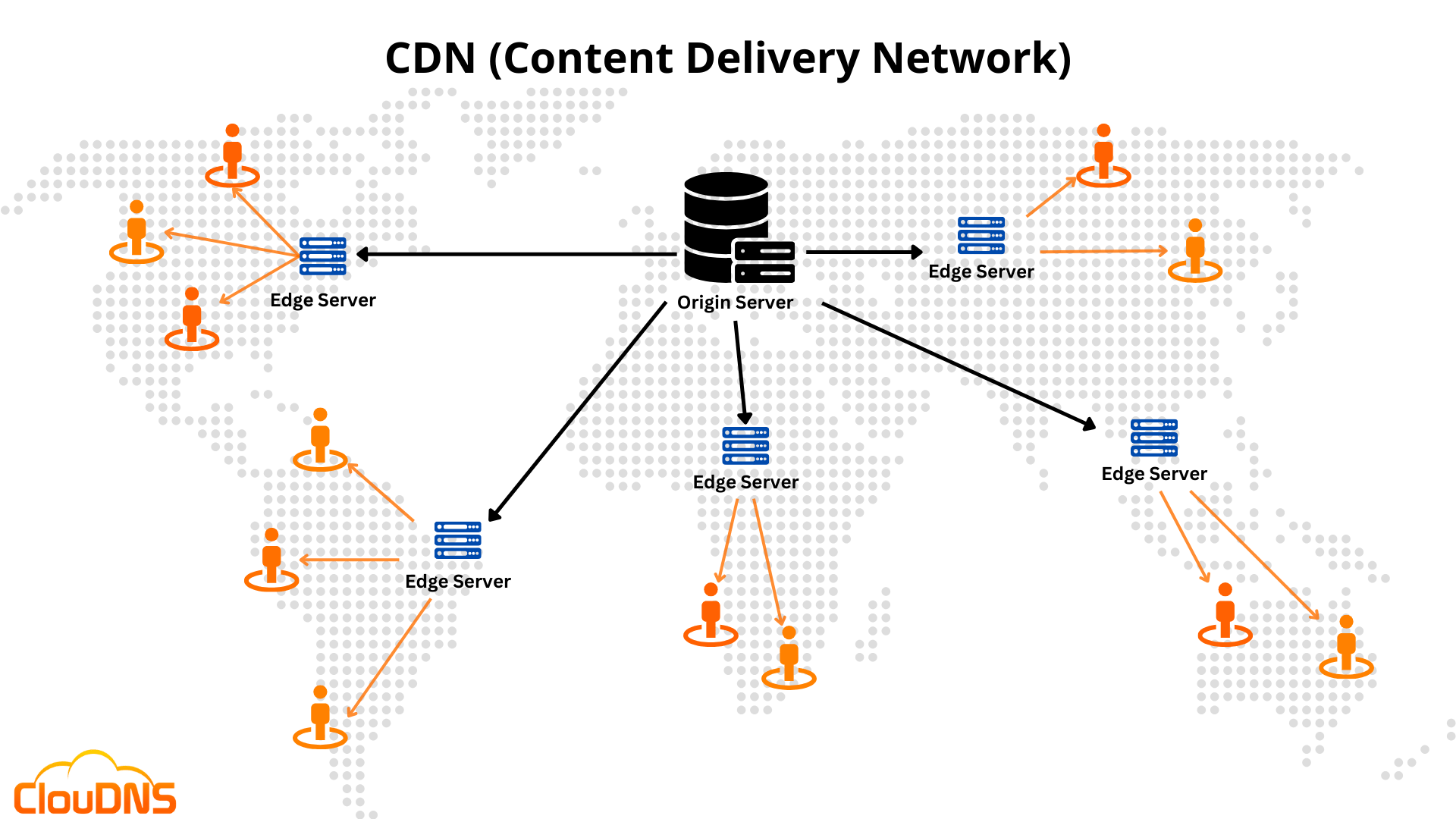
A CDN stores copies of your site's static assets (CSS, JS, images, videos) on servers located all over the world. When a user visits your store, the assets are served from the location closest to them.
Benefits of a CDN for Magento
In Magento, you can configure a CDN by going to Stores, then Configuration, then General, and then Web. Update the Base URLs for Static and Media files to point to your CDN URL.

One of the most common causes of slow Magento sites is "extension bloat." Every third-party module added to the system introduces new code that must be executed.
Best practices for extensions
Optimization is an ongoing process, not a one-time task. You must use professional tools to track your progress and identify new bottlenecks.
Key metrics to track include TTFB (backend speed), LCP (perceived loading speed), and CLS (visual stability).
Deciding whether to use a third-party performance extension or stick to native configuration depends on your technical expertise and the specific problem you are solving.
Scenario
Recommended approach
Basic speed improvement
Magento backend configuration and production mode
Heavy image optimization
Dedicated image optimization extension (e.g., for automated WebP conversion)
Advanced caching
Varnish + Redis infrastructure
Frontend JS optimization
Custom theme optimization or Hyvä Themes
Performance auditing
Monitoring tools like New Relic and Lighthouse
Optimizing Magento is a holistic task that spans from the database to the browser. By enabling core features like Full Page Cache and production mode, leveraging Varnish and Redis for high-speed data retrieval, and maintaining a lean extension architecture, you can provide a shopping experience that is both fast and reliable. High performance is the foundation upon which successful Magento stores are built.


